

Table of Contents
Notes on how to get Windows plugins without native Linux versions to work on Linux using the WINE Compability layer#
Preface#
The best thing would be to just use native Linux software and plugins to write your music and any audio production you might do, but I, and probably many others who are switching to Linux, own a lot of software, plugins and sample libraries that we have spent a lot of money on (especially sample libraries… 😭) and would like to still keep using them, if possible.
Luckily there are two tools, called WINE and Yabridge that together make it possible to be able to run a lot of Windows VST plugins and software in Linux.
Quick thing to remind is, that even if you might be able to run your Windows DAW of choice on Linux by using the WINE compability layer, it’s not going to be 100% stable as on Windows and you are going to have a lot more latency.
I haven’t tried running a Windows DAW through WINE, but from what I’ve read online and on forum threads, the common recommendation is to try to find a Linux Native DAW and learn to use that instead to avoid all the headache that will come with running a unsupported DAW.
Same with vst plugins, I would recommend trying to find native alternatives for any plugins you use that do not have Linux versions.
For synthesizers there is Surge-XT and Vital, and there are a lot of native effects plugins to choose from, like the Dragonfly Reverb Suite, Aether Reverb and TiagoLr’s Delay and other FX.
In Windows I’ve tried to use mostly stock DAW plugins from my Cubase DAW for effects and in Linux I have been able to do the same with the stock FX REAPER has, only adding the aforementioned Reverbs and Delay to replace the ValhallaVintageVerb (which works just fine using Yabridge and WINE btw) and NI Replika delay.
I have been keeping some notes on setting up REAPER to be a bit more comfortable to use for me which you can find here.
I’m not going to write on how to optimize your system for the lowest latency or anything of the sort, since that might vary depending on your distribution and in some cases the distribution comes pre-configured for audio production, like distros such as Ubuntu Studio do.
If you want to find out more on that topic, try searching for a setup guide for your distribution on the Linux Musicians Forum or just search for “your distro name pro audio realtime setup”
Finding plugins and help to get started.#
Linux DAW#
For finding plugins I’ve come across the Linux DAW website, a good database of different native free, foss and paid plugins to browse through, with tags to help make searching for specific stuff easier.
Linux Musicians Forum#
Anytime I have some issue with running non native plugins or something else, I go to search on the Linux Musicians Forum first, since a lot of times there is already a thread about the issue and possibly a fix to get things working (or a conclusion it’s not possible to get it running 😔)
Native samplers/sample libraries#
Sadly none of the large sampler plugins like Kontakt, SINE Player and EW Play support Linux, so pretty much all of the big sample libraries are not natively available on linux. Native ones I know of are:
DecentSampler, which a lot of Pianobook libraries use. I do have to mention that at least for me, the DecentSampler plugin is a bit buggy and always has a change to freeze and crash the daw if I try to open the BROWSE menu inside it, so if you encounter that issue try to always use the FILE>Load.. menu instead, to directly select the instrument file from the file browser, as that never has had any issues for me.
Soundbox which recently started supporting Linux.
Only have tried out one free library in it, but the plugin itself worked without issueThere’s a upcoming sampler called KODA that is still in development at the time I’m writing this, but the developer’s have mentioned that on VI-Control that native linux support is part the bigger vision for KODA, but it’s not top priority, so when it will come out is still unknown. Seeing Soundiron’s instruments on the teaser video for their sampler does make me hope that developers will start adopting the KODA platform after it comes out, so one day it’s possible to stop having to use WINE/Yabridge as a crutch to get good quality sample libraries on linux 😄
Crucial software you are going to need#
WINE and Yabridge#
This is the thing that makes everything possible. WINE works as a compability layer that helps Windows software work on linux and is needed by Yabridge.
You can probably find WINE on the repositories of your distribution
For Yabridge you can find the installation instruction on their GitHub repository .
Like they mention there, IT IS VERY IMPORTANT that you use wine version 9.21 or lower with Yabridge, since the current release of Yabridge will have GUI issues on VST plugins on newer wine versions, usually leading you to always need to move a window before mouse clicks are registered. There is a in-testing new-wine-10-embedding branch that I’ve been using for a while now that has not had any issues on the newest wine version, but on the master branch you have to use a older version until it’s updated with fixes.
Also read there on how to use the yabridgectl command line tool to add the windows plugins after installation, using the add and sync commands, you will need that later.
Winetricks#
This is a tool to tweak and add stuff to your WINE prefix, which you are probably going to need at some point, since a lot of apps need different libraries, fonts and other things to get working properly, It should hopefully be in the package repositories on your distribution of choice.
ILOK Licensing Service#
Ilok has worked OK for me, and plugins like EW PLAY that use it work too.
I seem to remember I had some issues with logging in to ILOK after initially installing it, but as I have a really bad memory, and didn’t write down the issue and fixes at the time, I sadly can’t list them here.
If you encounter any issues with logging in to ILOK, you can try running the app from the terminal using the command wine followed by the location of the ilok exe file in "" quotes to see the log while the program is running, so you can see any error text that pops up that you can then try googling to find the solution, or just try to an LLM to figure out the issue.
The location of the EXE file will probably be something like /home/YOURUSERNAMEHERE/.wine/drive_c/Program Files (x86)/iLok License Manager/iLok License Manager.exe
In Linux .wine and other such folders beginning with a dot are hidden by default, so you need to enable SHOW HIDDEN FOLDER/FILES in your file browser to see them.
The one thing to keep in mind with ILOK is that everytime you update WINE, deactivate all licenses from your machine beforehand, just in case the machine ID changes after the upgrade and you have to request a license removal from the old machine ID that will take time to happen.
Native Access/Kontakt#
The Native Access software is a pain to set up and every update can break it after you got it working + the library installation is a bit broken leading you to need to manually moun the iso files after very download to install them yourself. which is really tedious..
If possible backup your sample libraries to a external drive and then add them to the NATIVE ACCESS after copying them to your system drives, since its much faster that way.
I’ve sadly just decided to try to avoid kontakt on Linux because of that..
Hopefully developers will start adopting the KODA sampler after it comes out, since then that could be a good replacement for Kontakt if it gets the linux native version at some point like they seem to be intending.
Arturia Plugins#
The Arturia Software Center installs and works great for me!
I own the older V Collection 6 bundle and all the instruments have worked great for me in REAPER, so probably will work fine for anyone else too.
Eastwest Installation Center and PLAY#
Eastwest Play will require some fonts to work properly, and I don’t know which fonts specifically, so I reommend just running the winetricks allfonts command in the terminal that will install all the fonts winetricks has available to your wine prefix and that did the trick for me!
The Installation Center should install without an issue, allthough the GUI of it will look a bit wonky 😅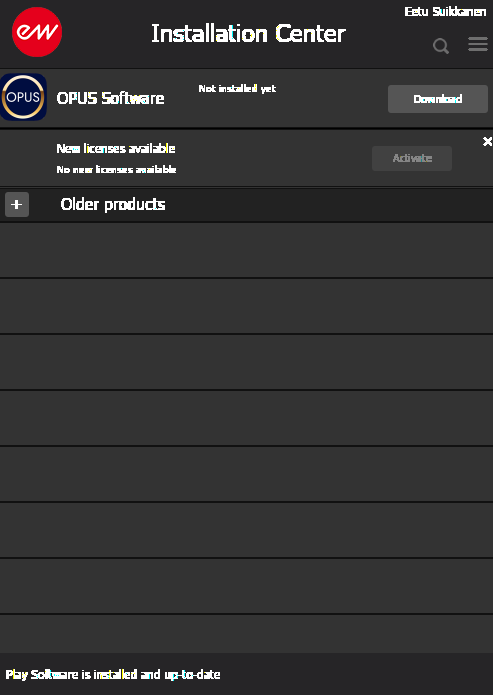
From there you should be able to install your plugins and sample libraries, but I do not own the newer OPUS player so I cannot say how well that will run… The old Play vst works almost perfectly for me at least, just with the weird issue of the GUI of the plugins becoming unresponsive if there are too many of them in the project at once, but I use them in a template where everything is pre-configured so it’s not an issue, as I don’t need to open the plugins that much.
Failed to import ISSKINU.DLL#
This error might come up while installing some plugins or software, which seems to mean that you are missing some windows runtimes that the software/installer requires.
I solved this by installing the vcrun6sp6 runtime package using winetricks, which you can do by running the winetricks vcrun6sp6 command in the terminal, or opening the Winetricks app going Select the default wineprefix>Install a Windows DLL or component>vcrun6sps6 and after selecting the package pressing OK to install it.
SINE Player#
Sine player will also install and work OK without issue, but the MY LICENSES tab where you can install your libraries from will not work.
That is because those parts of the plugin are actually web pages and require the msedgewebview which you have to go download from Microsoft’s website and from there choose the Evergreen Standalone Installer package to download and install, after installing that you have to open the winecfg tool, and from the applications tab there, choose add application browse to **Program Files (x86)>Microsoft>EdgeWebView>Application>140.0.3856.78 (or your current version number)>msedgewebview2.exe and after selecting the exe file, press open to add it.
After its added under the applications tab, choose it and change the Windows Version to Windows 7 like show in the image below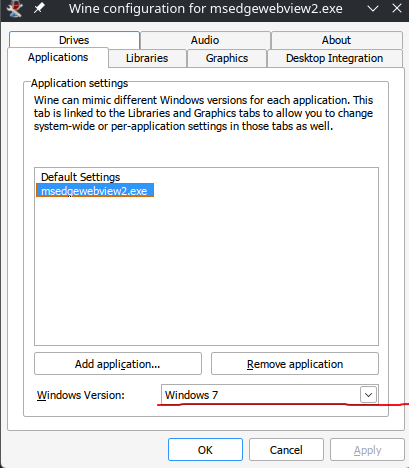
After doing that, click apply and ok. Now you should be able to open the Sine Player and the Store and My Licenses tabs should be working and you can install/download your libraries!
There are no articles to list here yet.