

Day 1#
Morning#
Before the theme was announced for this jam I was intending to do some sort of fantasy jrpg adjacent stuff with snes sounds, but with themes being space themed paintings I’m not so sure about that anymore 😅
So since I’m not set on what the heck I’m going to use for sounds, I’ll first come up with an initial idea on the piano that I hopefully can then just arrange the parts from after I get a feel for what sounds to use…
This time around I decided I’m not going to avoid the sort of template elements that I tend to gravitate towards subconsciously (i.e constant bVI-bVII- i usage, 4th/5ths progressions and sequences etc..) and just go with the flow of what comes out of my head 😄
Half an hour later I got a bit heroic theme going that I liked (albeit a bit too generic maybe 😅) and started to work onwards from that, coming up with 2 other sections and other stuff
After a few hours I got a minute and a half long sketch/base for the theme track in an OK state and since I still had 0 ideas on the instrumentation, I decided to stop for now and come back later in the evening when I’m back.
Initial sketch for the Theme#
Day 3#
Evening#
Tried to arrange something from the initial piano sketch yesterday, but the result was really crappy so I’m not even sharing that here 😂, and because of that I started a new track today in a completely different DAW to make things fresh
I’ve always used Reaper in Linux during jams, but I had heard a lot of good things about Bitwig from people in the OST Composing Jam community and since it has a Linux version, I decided to take the 30 day trial and give it a shot
First impressions of using it for a few hours is that it feels a bit similar to Cubase in a lot of ways, with the track inspector on the left, lower zone with the mixer/piano roll, and the media/plugin browser on the right.
The keybindings are different of course so the similarity in the UI makes me keep pressing Cubase keybinds accidentally 😅.
Overall Bitwig feels pretty great, but still feels a bit slow to use since I don’t know all the mouse modifiers and gestures, but I like that it has the same right click menu to switch between the DRAW, MOUSE, SLICE tools just like Cubase had (although sometimes I can’t trigger that menu and it only triggers the basic menu instead…)
For this new track I just browsed the stock sound/plugins in Bitwig and started noodling ideas and then just recorded what felt OK
I started out with a drumbeat that I played thing on top of, which kind of led to the whole track having this constant 4 on the floor dance/club track feel
The track itself feels ok, but fitting to theme? Thats a whole other thing 😅 I’m going to probably have to think of an actual made up game which I’m writing for, since without that to “guide” me in a direction I probably will just keep getting stuck/making things that feel off-theme….
And as I write this addition later at night, I actually found a nice little MIT licensed godot space shooter demo game, and I think I’ll use that as the game and try and write a menu/main theme, some stage/level music and maybe a mission complete/victory tune.
The demo game only has a never ending gameplay loop, but maybe I can try and script a score goal that then goes to a STAGE COMPLETE thing, and from there the player then heads to the next level and so on
I’m not a programmer, but maybe I can somehow set all of that up (or VIBE CODE it 😉), since I really like having a little demo game to hear the music in context like I did for the previous Mystery jam + this time I can actually make the demo playable from the browser!
Will this be THE GAME?#
Day 4#
Evening#
Today I decided to try to and arrange my piano sketch from Day 1 again, since now I had an idea of trying to do some eurodance/eurobeat-ish styled stuff.
I’d worked a bit on remixing an old track I did a long time ago using those sounds for the Impressions: Personal Project jam last year, but got a bit sick and ended up not finishing or submitting that track, so thought that this time I’ll try that style and actually finish the tracks 😂
Like I previously mentioned, this jam I’m just going to go with the flow in regards to the music, so I came up with the actual material for the track pretty quickly by just trying out ideas on the piano.
For the sounds I mostly went with eurodance/eurobeat sounding presets from the EURONAM patch bank for the old Synth1 synthesizer vst (great synth, and free!)
I initially laid down a basic house/eurobeat drum pattern and then just started jamming on the material I had come up with on the piano.
After recording those jams I then started arranging that to different parts, mostly following the basic eurobeat esque style of having the synth bass and some chordal synth stabs playing on the off beats giving the of feeling momentum and then synth leads and brasses playing the lead melody parts and more fuller chordal stuff too on the choruses.
A bit on the midi recording in Bitwig that I found really confusing is that if I start recording a take with the playhead not directly on the grid, the recorded midi does not line up with the other midi stuff visually and is in some sort of stretch mode with stretch markers on the side of the midi editor for the data?
I really hate that as a default setting and need to look up how to disable it or work around it, because its really getting on my nerves + the lack of retrospective midi recording which I’ve really grown dependent on from heavy usage of it in Cubase and Reaper 😅
But hey, got a new track started at least and will see tomorrow if this style feels the right way to go!
New style test stage music#
Day 5#
Evening#
Listening back to yesterday’s stuff, I still feel it will work, only the flow of the track felt a bit too jarring for me on the first listen.
Since I like the sound direction, I decided to give arranging the Day 1 sketch a new try and managed to get a rough version that I liked done in a few hours, but then felt a bit ear fatigued and decided to stop working on that for the day.
Went with mostly the same sounds as the previous track as I did it in the same project file (might case issues later down the line…😅) and only added a retro dance piano sound that just played the original piano sketch in the background while I added the actual arrangement on top of it.
Having the piano in the background might be a bit too much, but its not on overpowering sound. so I felt it could work and will probably hear with fresh ears tomorrow if I need to just take it out 😄
The style of the arrangement is pretty much just more of the same eurobeat esque stuff like the previous track had, so might be a bit too samey, but hey, at least they sound like they are from the same thing so that’s something 😉
Anyway here’s the new stage/level tune
New stage music?#
Day 6-9#
On these days I did not do much to all of the previously started tracks, but actually took a bit of a break in the music side of things and spent a bit of time adding more gameplay elements to the context demo game, since the Open Source Godot Shmup game by Kids Can Code only had a basic gameplay loop with enemies constantly appearing after all on the screen were defeated.
What I added to that base was a Boss enemy that appears replacing the normal enemies after the player reaches a score threshold, and all enemies have been cleared from the current wave.
I also added a health bar for the boss since the boss actually takes more than 1 hit to kill, unlike the basic enemies 😄
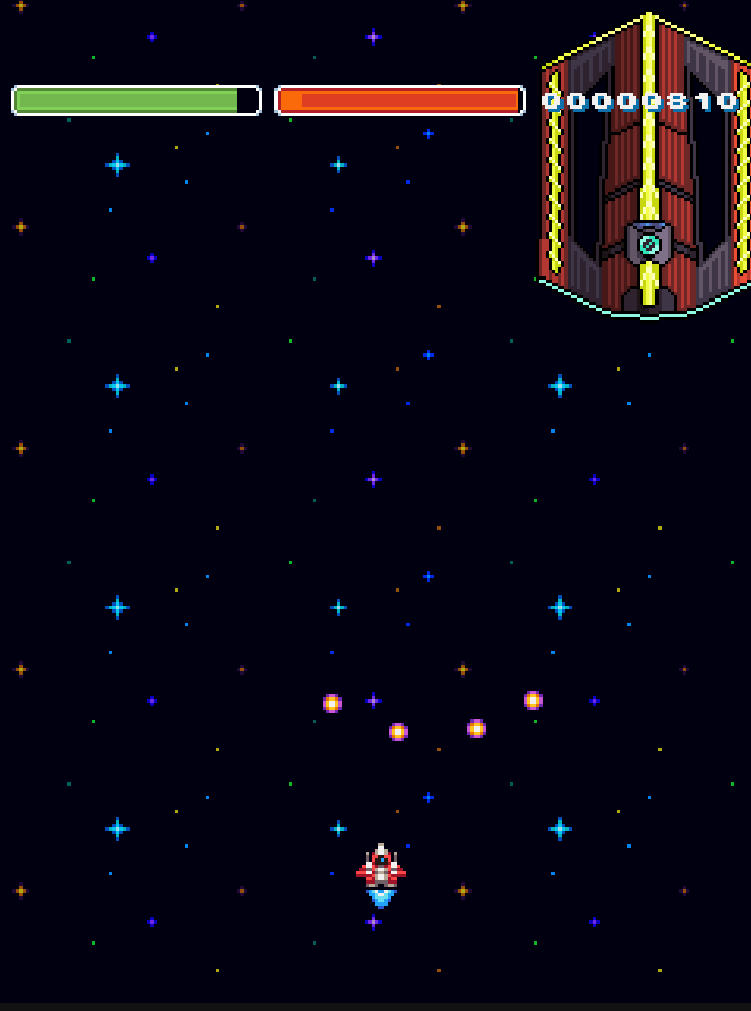
When the boss is defeated, the gameplay loop starts again with waves of basic enemies spawning constantly and then when the score threshold is met again its a boss fight and so on..
I made the score threshold value always double itself after every boss, since otherwise the player would have to fight the boss again after every wave which is not really fun 😅
There is no actual YOU WIN point in the game yet, but hopefully I can get something like that done with its own STAGE CLEAR music to go alongside it before the jam ends.
The idea to make a boss fight came from new track that I came up with while doing some late night jamming on the keyboard, as I liked the feel of the track with this sort of harmonic planing with sus chords in a sort of phrygian-ish tonality.
The fight is pretty boring with the boss just shooting 4 bullets in a spread constantly and nothing else, but I’m not a programmer and can only read the gdscript syntax a bit from all game jam and other fiddling around in Godot I’ve doen before, so that helps me to be able to code some basic slop code with the help of an LLM 😉
So all in all still need to make a more mellower title track for the phase before starting the game and then a stage clear/you win for the end, but there’s still 12 days or so left, so I’m not going to be rushing with stuff and just taking it easy, as you can probably tell with me forgetting to write the daily devlog stuff for day 6-9 and just writing these in one go on the 9th day 😂
Since I’ve been posting these devlogs daily on the blog site this time around, instead of only publishing them on the last day of the jam, I’ll put the link to the context game here already, even though its still wip in case anyone reading these already want’s to give it a shot.
Day 10-12#
Spent most of these days tweaking the demo game, by making the boss fly in from the top of the screen instead of just appearing suddenly in the middle and also making him sway a bit to the sides to make the fight a bit less boring than it was.
Then I got around to making an actual YOU WIN! screen that pops up when you clear the demo after killing the boss 2 times, with a prompt to play again if the player wants to, which just starts a fresh new game.
I also finally got around to learning a bit about the new “interactive” music streams in Godot, which enabled me to make the switches between tracks a lot smoother since they have options for different types of fades with variable lenghts and filler tracks to play between 2 tracks when switching, which are all great options to have.
I initally tried to use the AudioStreamPlaylist audiostream type, but after hitting my head against the wall I actually went to read all the Godot documentation for the audio stream types and realized I was trying to use the wrong stream for the wrong thing, as AudioStreamPlaylist is mostly for making a playlist of tracks that get played in order or randomly and not for what I was looking to use it for.
What I actually should’ve tried instead in the first place was AudioStreamInteractive which had everything I was looking for, and though it took me a while to learn how to use it from the documentation, but when I got my head around it a bit, it was a lot better than the hard cut switches between tracks using an array that I previously used 😂
I’m sure im using this totally in a sub-optimal way, but at least its working 😅
How I’ve got it setup now, is that I have all my music inside an AudioStreamInteractive with all the fade settings and everything else pre setup in the editor, then I just check if the music is playing and if its playing then change the music to one of the tracks I have assigned in the AudioStreamInteractive list on my AudioStreamPlayer node called BGM.
I have a variable called playback that checks if the music playing, and then if the music is playing, I switch the playing clip to a new one by a name I designate.
This switches to a new track, and then also triggers the fading/in between track and other things pre assigned from the editor, All the different audio files inside the AudioStreamInteractive are called clips, hence in the code the command is switch_to_clip_by_name, that naming was a bit confusing to me at first 😁
# Check if the AudioStream is playing?
var playback: AudioStreamPlaybackInteractive = bgm_player.get_stream_playback()

# If playing, then change to specified clip
if playback.is_playing():
		playback.switch_to_clip_by_name("JINGLE")
Thanks to the great features provided in the new audio streams, I can now actually have all of the music switching smoothly, and it was actually possible to have my victory music start fading in under the STAGE CLEAR jingle while the reverb and delay die out slowly, which made it feel a bit smoother to me.
I seriously should’ve done it this way from the start, but was too lazy and a bit afraid it would be too hard to learn how it works 😅 But now that I know a bit how to use it, it’s great!
Now I have the gameplay loop done and all of the tracks I need, so it’s just mostly polishing all the the music as as best I can and not really anything else.
I might not update this blog anymore for the rest of the jam since im going to mostly just be tweaking the production on my tracks and there’s not much to write about that, but if anything else worth mentioning comes up I might update this more, but nevertheless I will still do a final update on the last day either way.
I’m also thinking of putting the whole godot project files on GitHub if anyone wants to use the project to make their own music or sfx for it as practice, and since the original demo project I added my music and other tweaks on top of was MIT licensed on GitHub, I feel it’s in the spirit of open source to put my tweaked version up there too with an MIT License.
I probably will need to add some comments on the code to make it more clear what all the script functions do though, as I think its pretty rought to read since I’m not a programmer and half of the code is made with bouncing it back forth with an LLM…
But either way, that’s all for now.
The price of procrastination??#
Ended up procrastinating for the rest of the jam and didn’t work on the submission at all during that time, only coming back to work on it on the last 3 days.
Unfortunately, I had totally forgotten about the fact that I was using the trial version of Bitwig for this jam and the 30 day trial had run out during my procrastination break, meaning I couldn’t do anything the tracks anymore 😂
Luckily I had decided before hand to do the final mixing on the tracks in Reaper, so I had printed out the individual stems the last time I worked on the tracks, so not all was fucked yet 😅
So even if I could’ve changed the arrangement on the tracks a lot more, I had to just go with what I had done before and get them mixed and mastered, ready to submit.
For the mixing and mastering I wanted the tracks to sound a bit retro in a way, but not bitcrushed or anything like that, so I used tape saturation to get a bit of crunchyness and color to get them sounding a bit “older”
As of writing this, I think I overdid the saturation, and some parts ended a bit too crunched, but I already exported those out and uploaded the video and demo game for them, so I cant be arsed to do all that again 😅
Submitting#
At this point the only thing left is creating and submitting the itch project file, writing the submission page text and all that fun stuff.
The demo game is also uploaded and playable, and I added a pause menu with volume controls for the music and sfx that you can access with the ESC key after starting the gameplay.
And that’s all from me this time 👋
You can try the final demo game via the button below.
Demo Game